Process Checklist Issues — Detail
Last updated on: 2026-05-27 | Updated by: MAGNI Docs Team
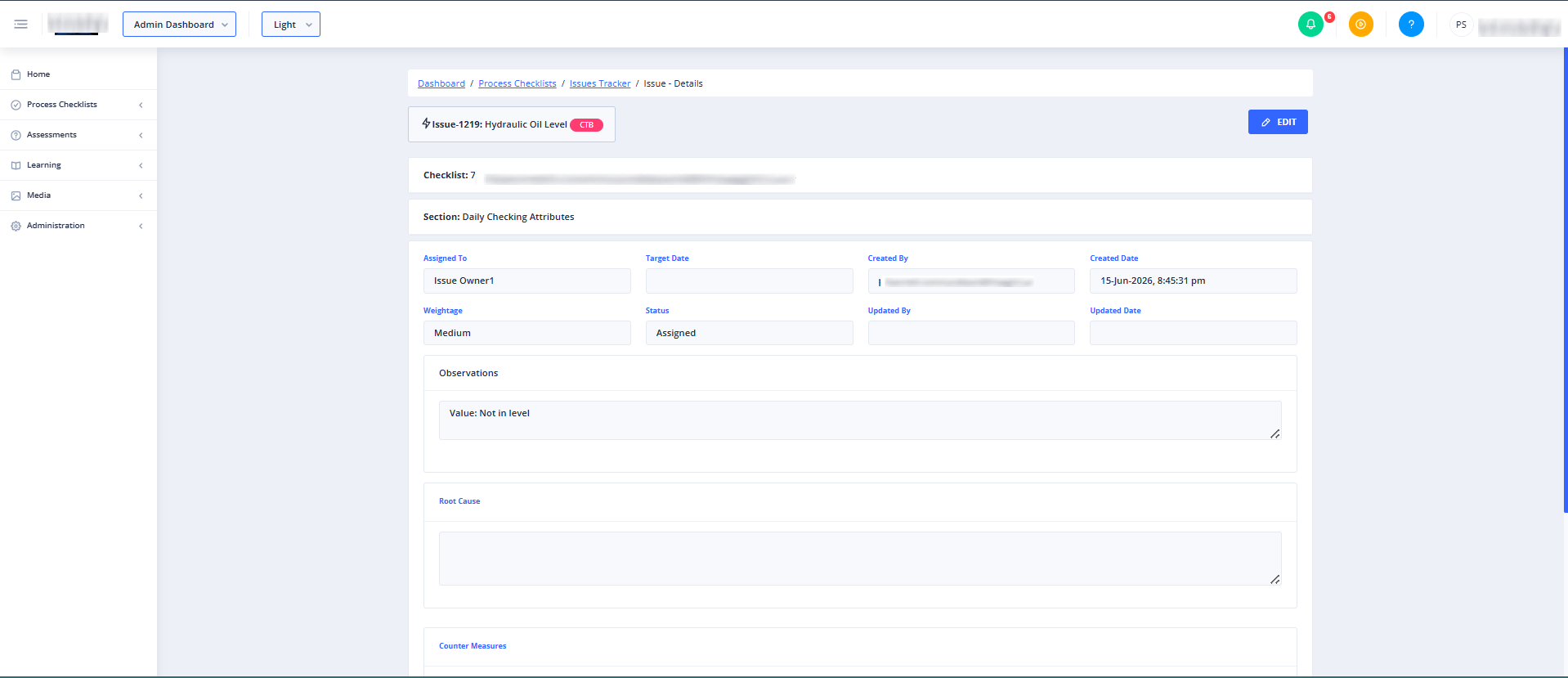
The Admin Checklists Process Issues Detail page allows administrators and managers to view, track, and manage specific issues raised during checklist runs or tasks. This centralized view helps administrators review the history of an issue, verify resolution details, and ensure quality standards are maintained.
Overview
This page dynamically displays issue details based on whether the issue was flagged during a general checklist process or a specific checklist task. It also automatically checks your organization's subscription and feature settings to ensure the Issues Tracker is enabled before displaying sensitive data.
Page Sections
Issue Detail Container
The main content area of this page dynamically loads different interfaces depending on the type of issue being viewed and your organization's configuration.
- Loading Indicator: A loading overlay appears while the system verifies your permissions and retrieves the issue details.
- Feature Not Enabled Screen: If the Issues Tracker is not enabled in your customer settings, a warning message is displayed stating "Issues Tracker Feature Not Enabled" and preventing access to the page.
- Checklist Issue Details: When viewing an issue associated with a checklist, this section displays the specific checklist issue details and its history.
- Task Issue Details: When viewing an issue associated with an individual task, this section displays the specific task details and resolution progress.
Feature Availability Rules
The visibility of issue details depends on specific administrative settings:
👤 Visible to: Administrators and Managers with permission to manage issues.
- For Process Checklist Issues: Visible only if "Allow Issues Tracker", "Allow Checklists", and "Allow Issues Tracker for Checklist" are all enabled in your customer profile.
- For Task Issues: Visible if "Allow Issues Tracker" is enabled for your organization.
Common Actions
| Action | How to do it |
|---|---|
| View Checklist Issue Details | Navigate to this page with a checklist-associated issue ID. The system automatically loads the checklist issue detail interface. |
| View Task Issue Details | Navigate to this page with a task-associated issue ID. The system automatically loads the task detail interface. |
| Access Help Resources | Click the blue question mark icon in the top header to access the help center. |
Tips
- Check Feature Settings First: If you see a "Feature Not Enabled" message, contact your system administrator to verify that both the Checklists feature and the Issues Tracker feature are enabled in your customer account settings.
- Identify Issue Types: Look at the page URL parameters or query parameters to determine if you are viewing a
checklistfeature issue or ataskfeature issue. - Quick Navigation: Use the left-hand sidebar to quickly return to the main Process Checklists or Product Checklists dashboards if you need to view the broader context of an issue.