Process Checklist Issues — Edit
Last updated on: 2026-05-27 | Updated by: MAGNI Docs Team
The Admin Checklists Process Issues — Edit page allows administrators to modify and update existing issues logged against process checklists or specific checklist tasks. This page ensures that any operational bottlenecks, defects, or compliance failures identified during checklists can be tracked, updated, and resolved efficiently.
👤 Visible to: Administrators and System Administrators with access to Process Checklists management.
Page Sections
Sidebar Navigation
The standard Magni navigation menu on the left side provides quick access to other administrative modules, including Home, Process Checklists, Product Checklists, Assessments, Learning, Media, eCommerce, Administration, and System settings.
Main Workspace
This area dynamically loads the appropriate editor or status message based on your organization's settings and the type of issue being edited.
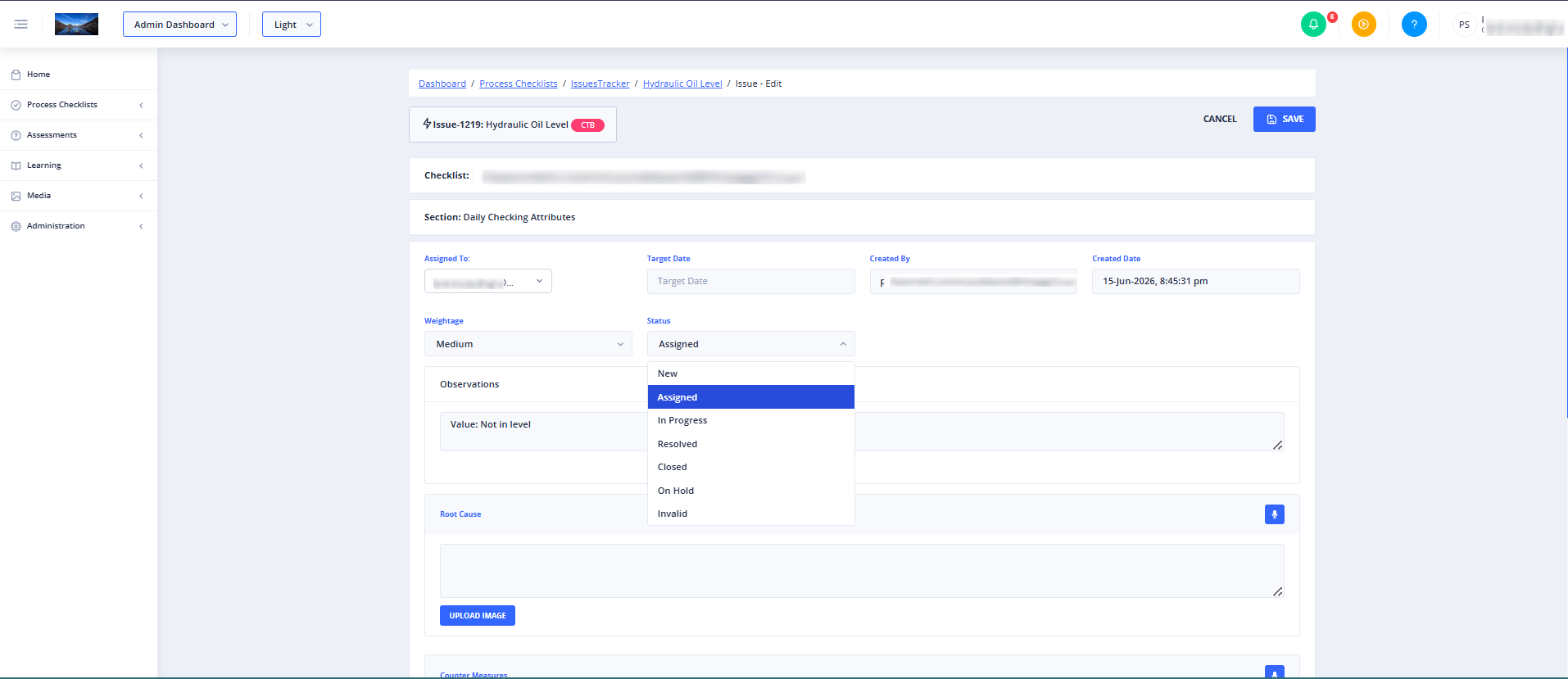
Depending on system configurations, one of the following states will display in the workspace:
- Checklist Issue Editor: Automatically loads when editing an issue associated directly with a checklist.
- Task Issue Editor: Automatically loads when editing an issue associated with a specific task within a checklist.
- Feature Not Enabled Message: Displays if the Issues Tracker has been deactivated in your organization's customer settings.
Conditional Visibility and Feature Access
The availability of the editing forms on this page depends on specific administrative permissions configured at the customer account level:
- For Checklist Issues: To view and edit checklist-level issues, your account must have the following options enabled:
- Allow Issues Tracker for Customer
- Allow Checklists (or Allow Product Checklists depending on the checklist type)
- Allow Issues Tracker for Checklist (or Allow Issues Tracker for Product Checklist)
- For Task Issues: To view and edit task-level issues, your account must have Allow Issues Tracker for Customer enabled.
If these conditions are not met, the page will display an Issues Tracker Feature Not Enabled message.
Common Actions
| Action | How to do it |
|---|---|
| Edit a Checklist Issue | Navigate to the edit route with the checklist feature query parameter active. The system will load the checklist issue form where you can update the issue details. |
| Edit a Task Issue | Navigate to the edit route with the task feature query parameter active. The system will load the task issue form where you can modify the task-specific issue. |
| Resolve "Feature Not Enabled" | Contact your System Administrator to verify that the Issues Tracker and Checklist permissions are fully enabled in your Customer Settings. |
Tips
- Check Your Permissions: If you encounter a "Feature Not Enabled" screen, verify that your customer profile has the Issues Tracker feature fully enabled for both the customer level and the specific checklist type.
- Wait for Loading: A loading spinner will briefly appear while the system verifies your organization's feature permissions and retrieves the issue details. Avoid refreshing the page while this process completes.
- Microphone: Use the Microphone icon to quickly fill the following fields using voice input for Root Cause Counter Measures New Comment Tap the Microphone icon, speak your input clearly, and the spoken text will be automatically converted into text and entered into the selected field.