Last updated on: 2026-05-25 | Updated by: MAGNI Docs Team
Courses
The Courses page is where administrators manage all learning courses within the Magni Learning Management System (LMS). This page provides a comprehensive list of courses, allowing you to view their details, status, and creation information. It is primarily used by administrators to oversee and manage the learning content available to users.
Overview
This page displays a list of all courses associated with your organization, whether they are published or still in draft. You can quickly search for specific courses, create new ones, and export course data for reporting or further analysis.
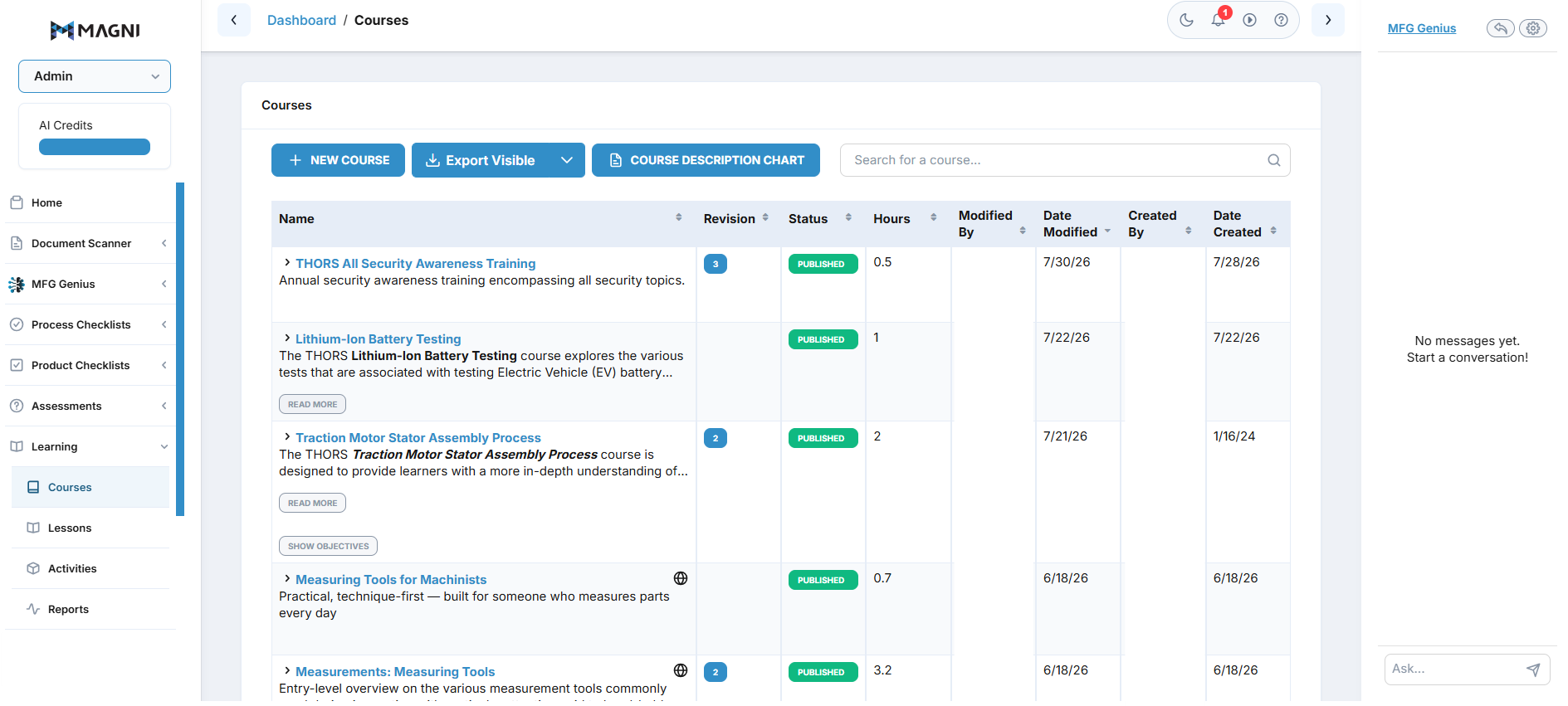
Page Sections
Breadcrumbs
Located at the top left, the breadcrumbs show your current navigation path: Dashboard > Courses. You can click on Dashboard to return to the main administration dashboard.
Unauthorized Access Message
👤 Visible to: Users without
courseReviewAllpermission
If you do not have the necessary permissions to view courses, a red alert message will appear at the top of the page, stating "Unauthorized to view courses". In this case, the rest of the page content will not be visible.
Courses List
This is the main section of the page, displaying a table of all courses.
Actions Bar
Above the course list, you'll find a set of actions:
- New Course Button: Click New Course to create a brand new course.
- Export Excel Button: Click Export Visible to download the current list of courses as an Excel spreadsheet or use dropdown to export a list of all courses.
- Course Description Chart: Click Course Description Chart to download the THORS Academy Course Description Chart.
- Search Bar: Use the search bar to filter the course list. Type a course name or keyword into the field and press Enter or click the search icon to apply the filter.

Course Table
The table lists courses with the following columns:
- Name: The title of the course. Some course names may be very long; click the arrow next to the name to expand and view the full description and "Read More" link.
- Revision: The current revision number of the course.
- Status: Indicates whether the course is
Published(available to learners) orUnpublished(in draft or review). - Hours: The estimated learning hours required to complete the course.
- Modified By: The user who last modified the course.
- Date Modified: The date when the course was last modified.
- Created By: The user who originally created the course.
- Date Created: The date when the course was originally created.
When a course row is expanded, you can see a brief description of the course and a Read More link, which likely leads to a detailed view of the course.
Common Actions
| Action | How to do it