Courses — Create
Last updated on: 2026-05-25 | Updated by: MAGNI Docs Team
This help page guides you through creating new courses in the Magni Learning Management System (LMS). This page is used by users with permissions to create and manage courses, typically administrators or content managers, to define new learning content.
Overview
The "Courses — Create" page allows you to initiate the creation of a new course by providing its name. Once the course is named and saved, you will be redirected to the course editing view where you can add more details, content, and manage its publication status.
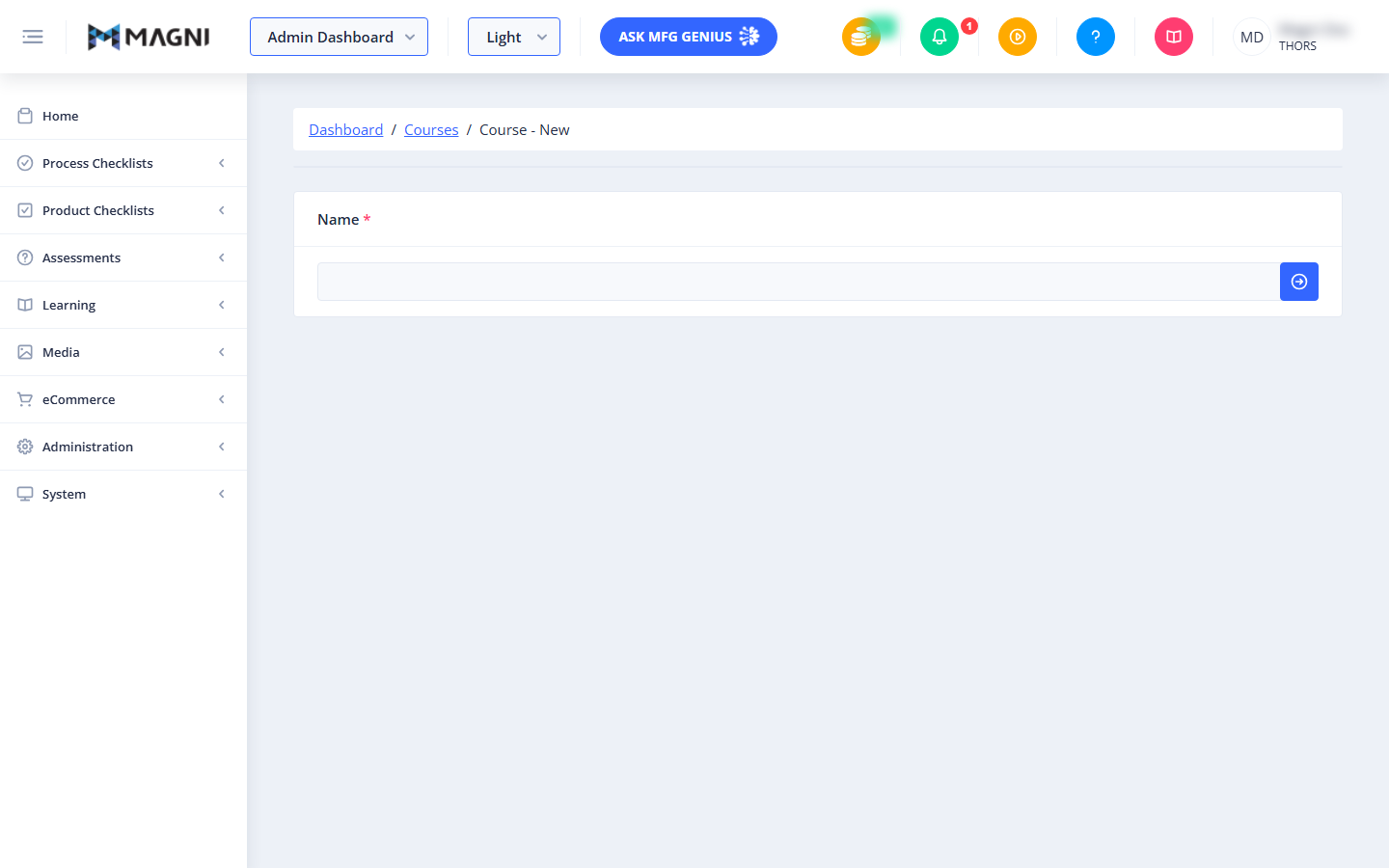
Page Sections
Unauthorized Access
If you do not have the necessary permissions to update courses, a red alert message will be displayed, indicating that you are "Unauthorized to update courses." In this case, you will not be able to access the course creation form.
👤 Visible to: Users without permission to update courses.
Breadcrumbs
At the top of the page, a breadcrumb navigation trail helps you understand your current location within the system:
- Dashboard: Links back to the main administration dashboard.
- Courses: Links to the list of all courses.
- Courses — Create: Indicates you are on the page for creating a new course.
Course Creation Form
This section contains the primary input field for creating your new course.
Name
- Purpose: This is the mandatory name for your new course.
- Required: Yes.
- Validation: The course name must be unique. If you enter a name that already exists, a warning will appear stating "Name already in use... Please pick a unique name."
- Action: As you type the name, the system attempts to save it. If you are creating a new course, entering a name and successfully saving it will create a draft course and redirect you to the course's edit page.

Course Management Bar (Visible in Edit Mode Only)
This section appears once a course has been successfully created and you are viewing it in edit mode (after entering a name and being redirected). It provides options for managing the course's status and details.
👤 Visible to: Users with permission to update courses, only when editing an existing course draft.
- Draft Status Button: Displays "Draft" indicating the course is currently in a draft state. This is a display-only button.
- Publish Button:
- Purpose: Publishes the current course draft, making it available to users.
- Action: Clicking this button may prompt you to decide whether to update the AI model with the course changes.
- If you have the
ArtificialIntelligenceDefaultPublishCourserole, a dialog titled "Update AI Model?" will appear with two options: "Publish & Update" (publishes the course and updates the AI chat system) or "Publish Only" (publishes the course without updating the AI model). - If you do not have this role, the course will be published directly without the AI model update prompt.
- If you have the
- Validation: The course must be valid to be published. If there are validation errors (e.g., missing required information), a warning will appear, and the course will not be published.
- Delete Draft Button:
- Purpose: Deletes the current course draft.
- Action: Clicking this button will open a confirmation dialog (
DeleteConfirmationComponent) to ensure you want to delete the course. If confirmed, the course draft will be permanently removed.
- Last Modified By: Displays the name of the user who last modified the course and the date/time of the modification.
Course Details Form Fields (Visible in Edit Mode Only)
Once a course is created and you are in edit mode, the full course form becomes available, allowing you to define all aspects of your course. Any changes made to these fields are automatically saved.
👤 Visible to: Users with permission to update courses, only when editing an existing course draft.
- Name: (As described above) You can update the course name here.
- Description:
- Purpose: Provides a detailed description of the course content and objectives.
- Action: Updates the course description.
- Learning Hours:
- Purpose: Specifies the estimated number of learning hours required to complete the course.
- Action: Updates the course's learning hours.
- Category Tag:
- Purpose: Assigns a category tag to the course for organization and filtering.
- Action: Updates the course's category tag.
- Course Tag:
- Purpose: Assigns a general course tag for further classification.
- Action: Updates the course's course tag.
- Blooms Category Tags:
- Purpose: Assigns one or more Bloom's Taxonomy category tags to the course, indicating the cognitive level of learning.
- Action: Updates the course's Bloom's Category Tags.
- Enforce Order:
- Purpose: A toggle that, when enabled, requires learners to complete lessons within the course in a specific sequence.
- Action: Toggles whether the order of lessons is enforced for learners.
Common Actions
| Action | How to do it