Last updated on: 2026-05-25 | Updated by: MAGNI Docs Team
Access Codes — Create
This page allows administrators to create new access codes. Access codes provide a way to grant specific users access to a set of quizzes or assessments, often with an expiration date and custom notification settings.
👤 Visible to: Administrators with "Access Code" feature enabled.
Overview
Access codes are used to manage who can take specific quizzes and under what conditions. On this page, you can define the code's name, expiration, passing threshold, associated quizzes, and various notification settings for both administrators and examinees.
Admin Codes Wizard
This page allows authorized users to choose between two methods for creating new access codes, primarily used for managing access to assessments. It provides flexibility, offering a guided wizard for new users and an advanced option for experienced users who need to quickly configure all details.
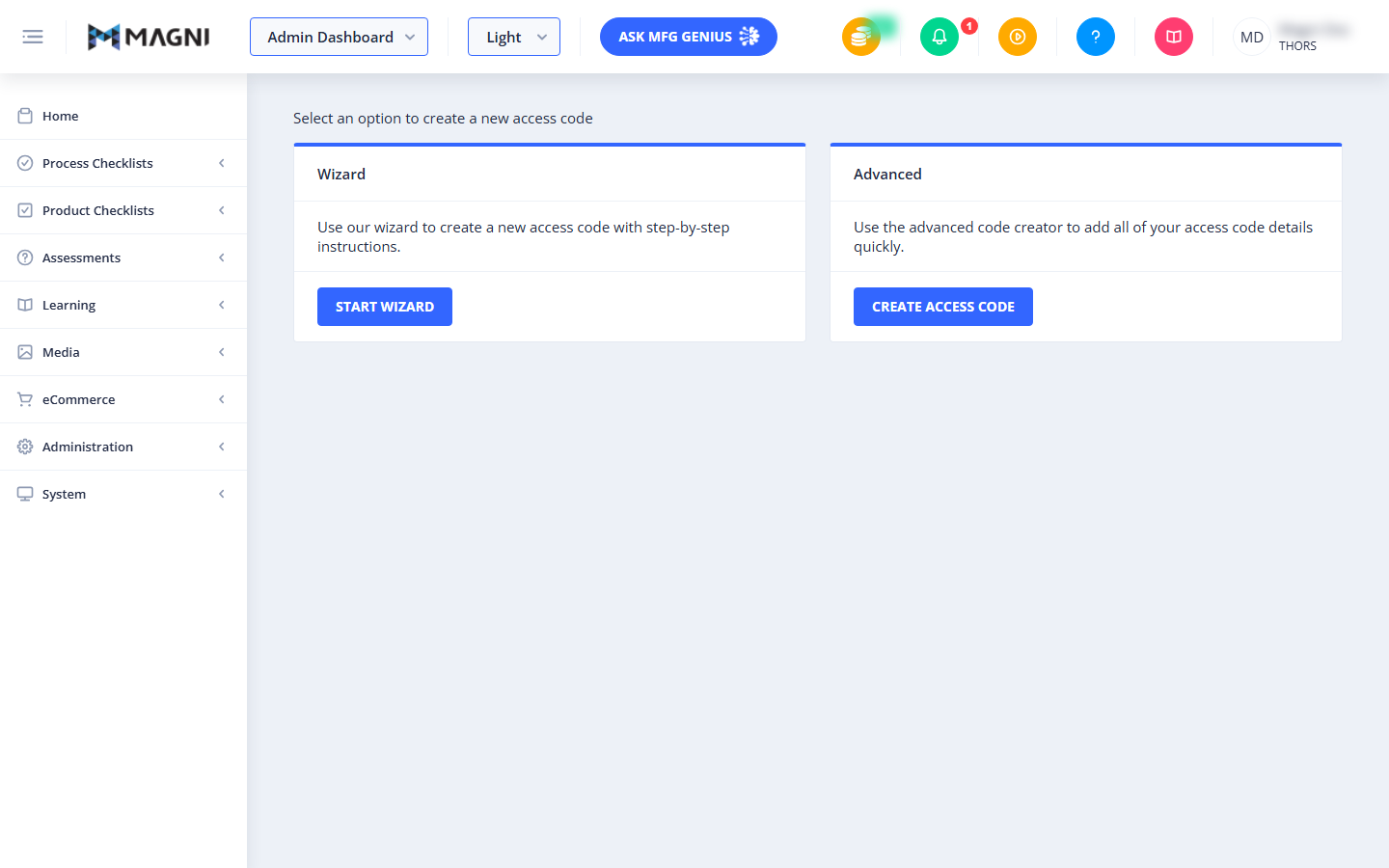
Access Code Creation Options
This section presents two distinct methods for creating access codes. Both options are displayed as cards, each with a header, a brief description, and a button to proceed.
👤 Visible to: Users with permissions to create codes.
-
Wizard Card:
- Header: Wizard
- Description: This option guides you through the process of creating a new access code using step-by-step instructions. It's ideal for users who prefer a structured approach or are new to creating access codes.
- Button: Start Wizard – Clicking this button will take you to the first step of the access code creation wizard.
-
Advanced Card:
- Header: Advanced
- Description: This option allows you to quickly add all the necessary details for your access code using an advanced creator. It's suitable for experienced users who know all the required configurations and want to enter them efficiently.
- Button: Create Access Code – Clicking this button will take you to a page where you can directly input all access code details.
Choose Advanced Options
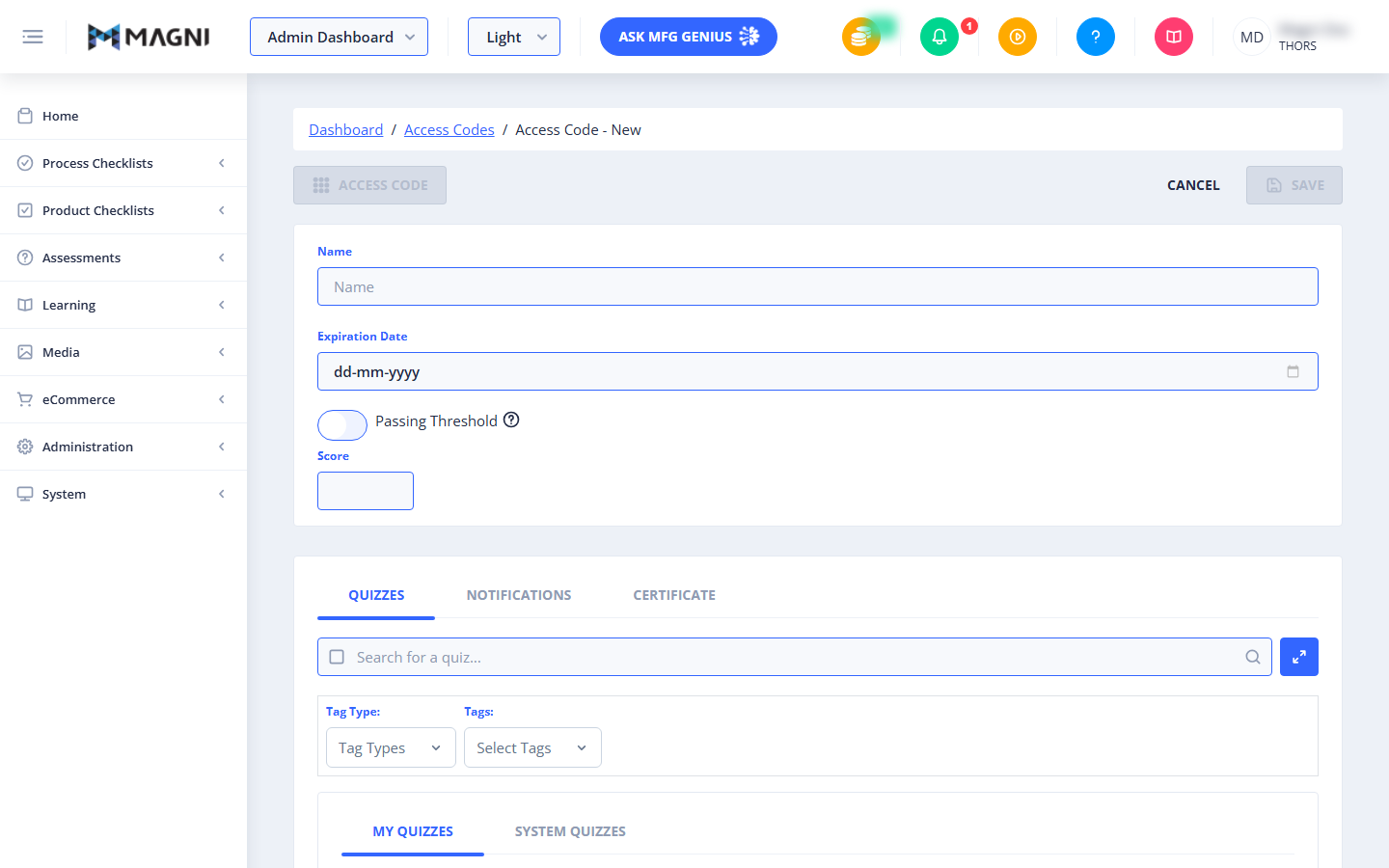
Page Sections
Access Code Details
This section contains the core settings for your new access code.
Common Actions
| Action | How to do it |
|---|---|
| Start creating a new access code | Go to the Admin Codes Wizard screen and choose either the Wizard or Advanced card |
| Use the guided, step-by-step flow | On the Wizard card, click Start Wizard |
| Enter all details at once | On the Advanced card, click Create Access Code |
| Name the access code | Enter a name in the Access Code Details section |
| Set when the code expires | Enter an expiration date/setting in the Access Code Details section |
| Set a passing threshold for the code | Enter the minimum passing score in the Access Code Details section |
| Associate quizzes/assessments with the code | Select the quizzes or assessments this code should grant access to |
| Configure admin notifications | Set up the notification options for administrators in the notification settings |
| Configure examinee notifications | Set up the notification options for examinees in the notification settings |
| Save the new access code | Complete all required fields, then submit/save from the Wizard's final step or the Advanced creator |
Tips
- Choose Wizard if you're new to access codes or want to be walked through each setting step by step; choose Advanced if you already know the configuration you need and want to enter everything on one page.
- This page — and the ability to create codes — is only visible to administrators with the Access Code feature enabled, so if you don't see it, check with your account admin about enabling that feature.
- Have your quiz/assessment list, expiration date, and passing threshold ready before starting the Advanced flow, since it expects all details up front rather than guiding you through them.
- Notification settings apply separately to administrators and examinees — review both so the right people are notified at the right points (e.g., code issued, code expiring, code used).
- Double-check the expiration date and passing threshold before saving; these directly control who can still use the code and what score they need to pass.