Process Checklist Setting — Reminders
Last updated on: 2026-05-26 | Updated by: MAGNI Docs Team
This page allows administrators to configure and manage automated reminder notifications for specific Process Checklists. These reminders help ensure timely completion of checklists by prompting assigned users who have not yet completed their required forms or signatures.
Overview
The Process Checklist - Reminders page displays all reminders that have been created for a specific process checklist. From this page, administrators can view, manage, enable, or disable reminders in bulk or individually.
Page Sections
The page consists of breadcrumb navigation, administrative controls, and a detailed scheduling card.
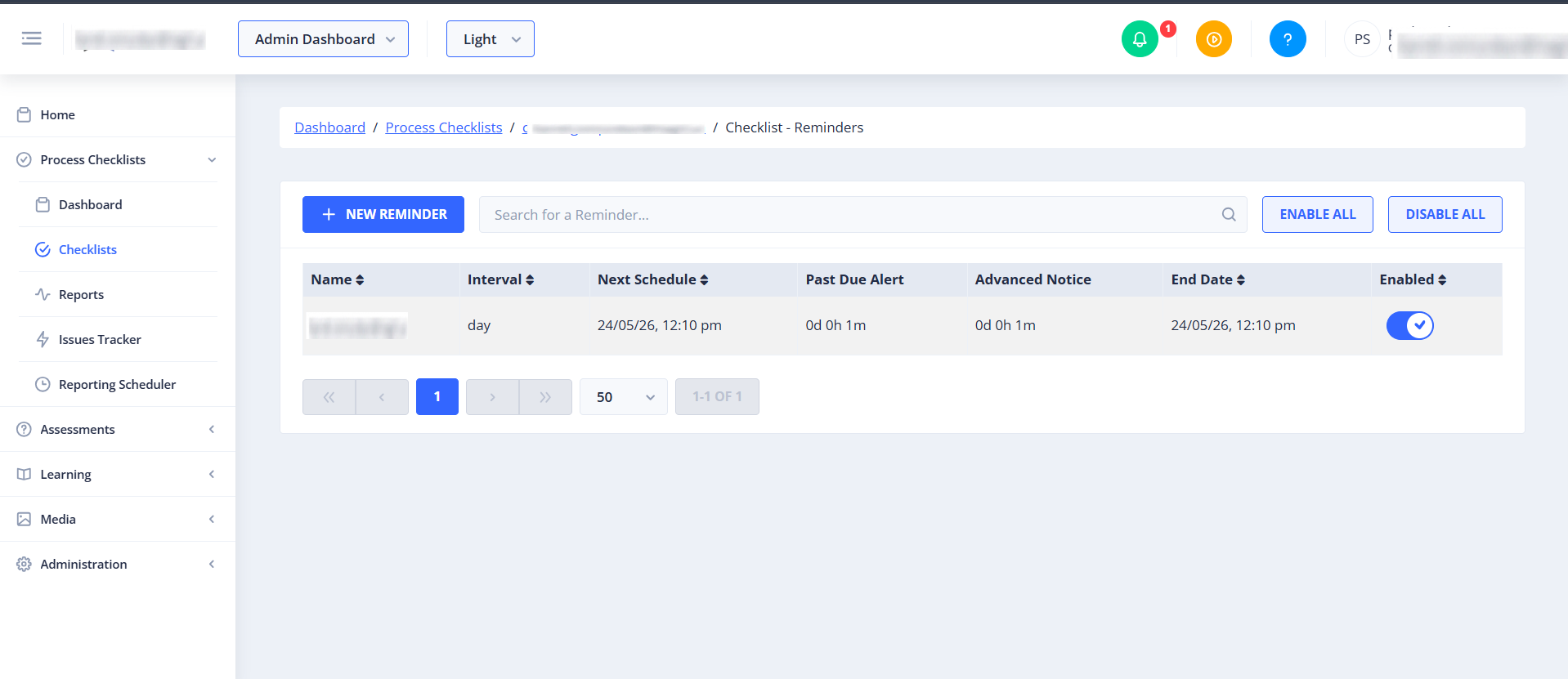
Breadcrumb Navigation
Located at the top of the page, this path allows you to quickly navigate back to the main Dashboard, the Process Checklists list, or the specific checklist associated with this reminder.
Alert on missed Checklist Reminder
![[admin-checklists-process-alerts-missed-reminder.png]]
This section controls notifications sent when an assigned checklist is not completed within its scheduled timeframe.
- Alert when checklist is not submitted within the wait time: Toggle this to enable or disable missed deadline alerts.
Email Configuration:
- Use Default Checkbox: Toggle to use the standard system-generated missed reminder email template.
- Subject Textarea: (Only available when "Use Default" is disabled) Enter a custom subject line for the missed reminder email.
- Body Textarea: (Only available when "Use Default" is disabled) Enter custom body text for the email notification. -->
- Contact List: Displays a table of all users configured to receive missed reminder alerts.
Action Controls
- New Reminder Button: - Clicking the + NEW REMINDER button allows the user to create a new reminder for the current checklist and Opens the Reminder Creation form.
- Search bar: Use the Search for a Reminder... input field to filter reminders by name in real time.
Common Actions
| Action | How to do it |
|---|---|
| Enable/Disable a Reminder | Toggle the switch next to the **End date to either Enabled or Disabled. Changes save automatically on blur. |
| Enable all/Disable all a Reminder | By clicking Enable All or Disable All reminders. Enable All enables every reminder listed on the Reminder page, while Disable All disables every reminder. The changes are saved automatically. |
Tips
- Use ENABLE ALL or DISABLE ALL when you need to quickly activate or pause all reminders for a checklist during maintenance or process updates.
- Use the Search bar to quickly find a specific reminder when the list is large.
- Check the Next Schedule column to confirm reminders are set to trigger at the correct time.
- Review the End Date column regularly to ensure reminders are not running past their intended period.