Product Checklists — Alerts
Last updated on: 2026-05-26 | Updated by: MAGNI Docs Team
This page allows administrators to configure automated notifications for Product Checklists. You can set up alerts to trigger when a checklist is submitted or when a non-conformance (a failed check or standard) is recorded.
This feature is primarily used by Quality Assurance Managers, Operations Administrators, and System Administrators to ensure key stakeholders are immediately notified of checklist completions and quality issues.
Page Sections
Breadcrumbs and Information Banner
The top of the page features a breadcrumb navigation trail to help you easily return to the Dashboard or the main Product Checklists list. Below the breadcrumbs, an information banner reminds you of the system's notification priority: if both Email and SMS are configured for a contact, the system will default to sending an email notification only.
👤 Role Restriction: Editing these settings requires checklist update permissions. If you do not have the required permissions, all form fields and checkboxes will be disabled.
Alert on Submission
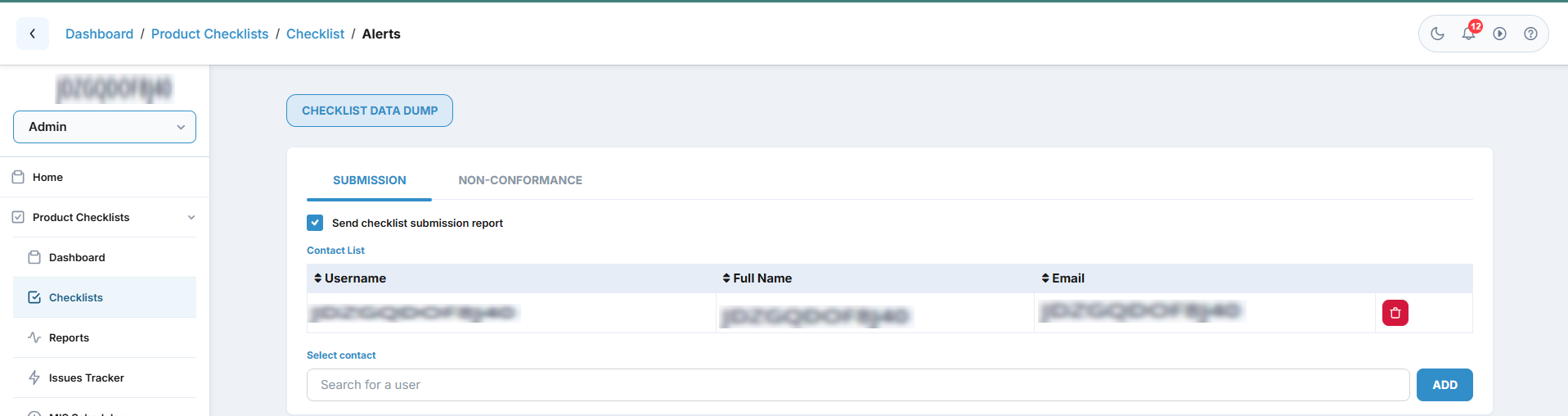
This section allows you to configure notifications that are sent automatically whenever a user submits a completed checklist.
- Send checklist submission report: Toggle this on to enable submission alerts.
- Email Configuration: When enabled, you can manage how the email notification is formatted:
- Use Default Checkbox: When checked, the system sends a standard system-generated email.
- Include User Response Checkbox: (Available when "Use Default" is active) Check this to include the user's completed checklist answers directly in the email notification.
- Custom Subject & Body: (Available if "Use Default" is unchecked) Allows you to write a custom subject line and email body. These fields are required if you choose not to use the default template. -->
- Contact List: A table listing all users configured to receive these alerts. You can sort this list by Username, Full Name, or Email.
Alert on Non-Conformance
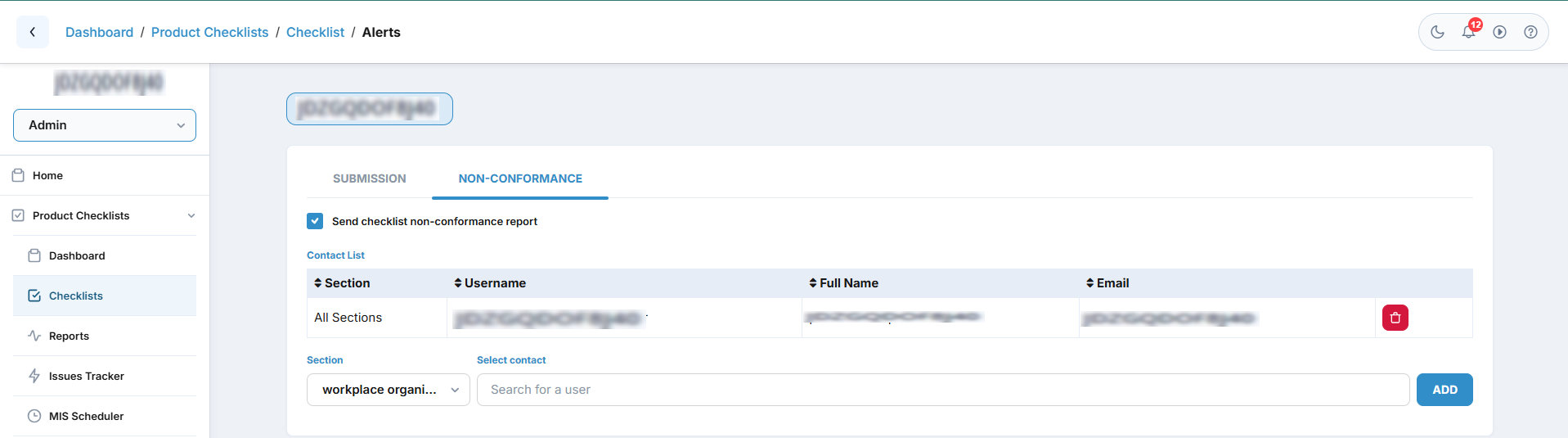
This section allows you to configure notifications that are sent immediately when a user marks a question as a non-conformance (a failed check) during a checklist run.
- Send checklist non-conformance report: Toggle this on to enable instant alerts for failed checklist items.
- Contact List Link: Click this link to expand and manage the list of users who should receive non-conformance alerts.
Common Actions
| Action | How to do it |
|---|---|
| Enable Submission Alerts | Check the Send checklist submission report checkbox. |
| Sort the Contact List | Click on the Username, Full Name, or Email column headers in the Contact Alert List table to sort the contacts. |
| Enable Non-Conformance Alerts | Check the Send checklist non-conformance report checkbox. |
Tips
- Keep "Include User Response" Enabled: When using default submission alerts, keeping "Include user response" checked ensures that managers can review the checklist answers directly from their email inbox without needing to log into Magni.
- Verify Feature Enablement: If you see a "Feature Not Enabled" message instead of the configuration panels, contact your System Administrator to ensure the Checklists module is active for your organization.
- Email Priority: Remember that if a contact has both an email address and a phone number configured, Magni will prioritize sending an email alert. Ensure your critical contacts have valid email addresses saved in their profiles.