Product Checklist Setting — Authorization
Last updated on: 2026-05-26 | Updated by: MAGNI Docs Team
The Product Checklists — Authorization page allows administrators to control who has permission to access, fill out, and submit specific product checklists. By configuring these settings, you can restrict checklist access to qualified personnel and manage collaborative draft-sharing options.
Page Sections
Authorization & Draft Sharing Settings
This section contains the top-level controls for enabling authorization requirements and draft sharing on the selected checklist.
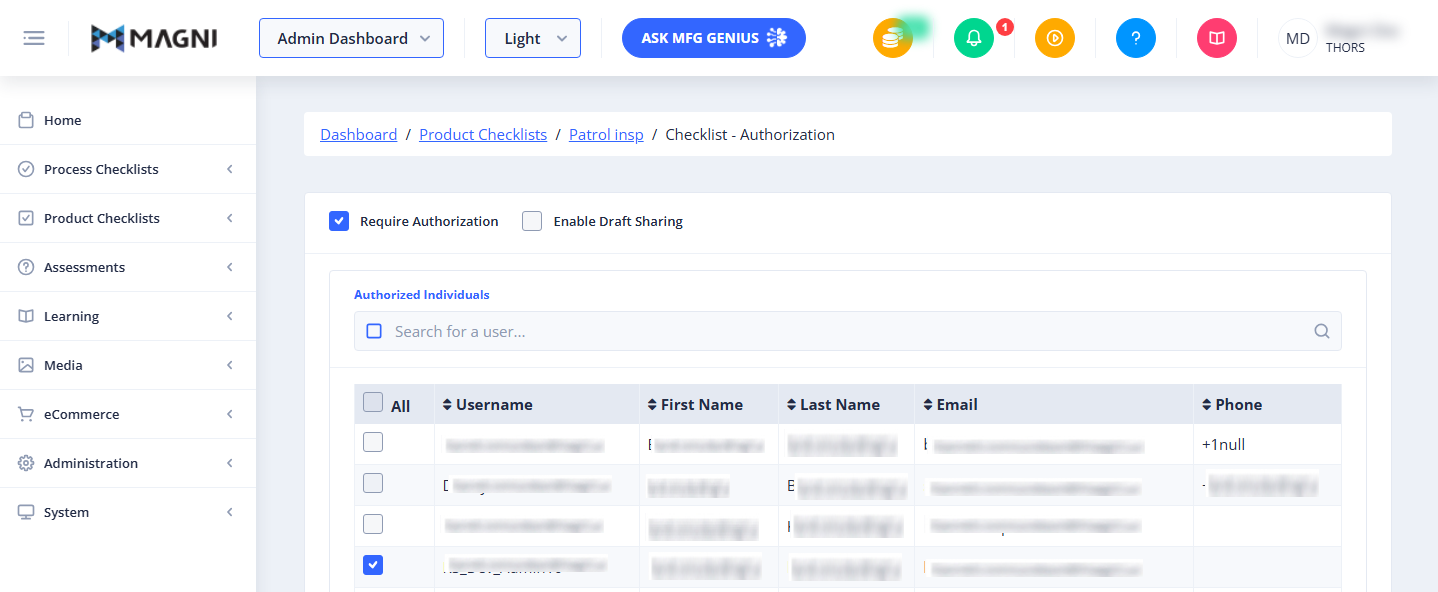
- Require Authorization Checkbox: When checked, only the specific users selected in the "Authorized Individuals" table below will be allowed to access and complete this checklist. If unchecked, the checklist is accessible to all users with standard checklist permissions.
- Enable Draft Sharing Checkbox: This option becomes available only when Require Authorization is enabled. When checked, authorized users can share in-progress drafts of the checklist with other authorized team members for collaborative completion.
- Show Locked Draft Submissions Button: This button only appears if there are active, locked draft submissions associated with this checklist. Clicking it allows administrators to view and manage these locked drafts.
👤 Role Restriction: These settings are only editable by users with administrator update permissions. If you do not have the required permissions, these options will be disabled.
Authorized Individuals
This section appears only when the Require Authorization checkbox is enabled. It allows you to search for and select the specific users who are authorized to use this checklist.

- Toggle Selected Button: Located to the left of the search input, this button filters the list to display only the users who are currently selected/authorized.
- Search Input: Type a user's name or username to quickly filter the list of available users.
- All Checkbox: Selects or deselects all users currently visible in the list.
- User Table: Displays a list of users with the following columns:
- Username: The user's unique system login name.
- First Name: The user's first name.
- Last Name: The user's last name.
- Email: The user's registered email address.
- Phone: The user's registered phone number.
You can sort the table by clicking on the Username, First Name, or Last Name column headers.
Feature and Limit Warnings
Depending on your organization's subscription plan and configuration, you may see the following status messages:
- Feature Not Enabled: Displays if Product Checklists, Authorization, or Draft Sharing features are not enabled for your account.
- Limit Exceeded: Displays if your organization has reached its plan limit for Authorized Product Checklists or Product Checklist Draft Sharing.
Common Actions
| Action | How to do it |
|---|---|
| Require checklist authorization | Check the Require Authorization checkbox at the top of the page. |
| Authorize specific users | 1. Ensure Require Authorization is checked. 2. Use the search bar to find the desired users. 3. Check the box next to each user's name in the table to authorize them. |
| Remove authorization from a user | Uncheck the box next to the user's name in the table. |
| Enable collaborative draft sharing | 1. Ensure Require Authorization is checked. 2. Check the Enable Draft Sharing checkbox. |
| View only authorized users | Click the Toggle Selected button (square icon) to the left of the search bar to filter out unauthorized users. |
Tips
- Use Filters for Large Teams: If your organization has many users, use the search bar or click the Toggle Selected button to quickly find and verify who has access without scrolling through multiple pages.
- Collaborative Checklists: Enable Draft Sharing for complex product inspections that require input or hand-offs between multiple operators on different shifts.
- Check Plan Limits: If you are unable to authorize a checklist or enable draft sharing, check the top of the page for "Limit Exceeded" warnings, which indicate you may need to upgrade your subscription level.